Welcome to Book For Work Enterprise API! In this guide you will find an introduction to our API.
All endpoints require HMAC-SHA256 signature authentication via the authorization header and in order to access the API you need to have your API key and secret. If you do not have it or you have lost it, please contact our sales team at sales@bookforwork.com.
Our API is designed to:
- Download content about properties (description, images, rooms, etc.)
- Make bookings
- Manage bookings
The content section has 3 endpoints:
- Get Properties List by Country, which allows you to retrieve the ids and some basic information about our available properties.
- Get Property Details by ID, which allows you to go into detail and get all the relevant information about the property (description, images, rooms, etc.).
- Static Content Reference List, which allows you to retrieve static information about property categories (ex. B&B), property attributes (ex. pet friendly), property amenities (ex. free transfer), room amenities (ex. floor heating), treatment categories (ex. breakfast included). Treatment categories are important if you need to map treatments on your side to present the user a more intuitive experience when reading treatment options.
In the first endpoint you will find the property ids of all the available properties. You will need to save those ids as they will be necessary to search for availability. In the second endpoint you will find all the available details for each property.
Content can be retrieved either in Italian or English.
Important information about property details
Our Get Property Details by ID endpoint contains a substantial amount of information for each property. We strive to keep content updated because it massively improves the user experience and you should also consider to make it a common practice. Among the provided information you must show to the user instructions, special instructions, mandatory fees and optional fees. The first two fields contain information about check-in and other instructions for the client, while the last two give information about charges that the client is expected to pay at the property.
In the Search Property Availability response we do not always return information about the charges to be paid at the property. Those have to be retrieved from the Get Property Details by ID endpoint under mandatory_fees and must be shown throughout the whole booking flow to the user.
In the recent years there has been an increase in the number of properties that do not offer a 24/7 front desk. Clients must be aware of the check-in process and you must show them the instructions, the checkin_begin_time and the checkin_end_time.
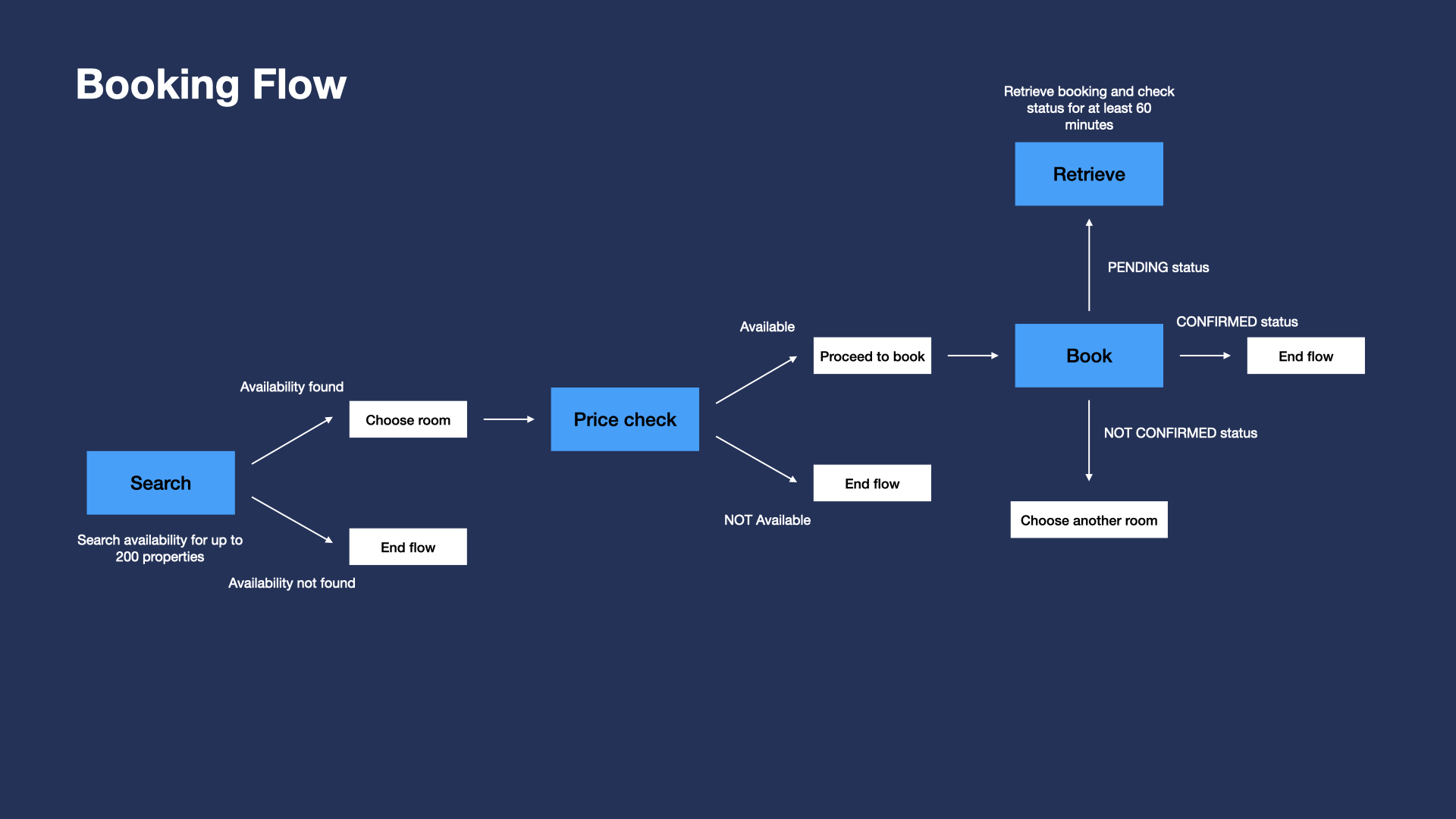
The booking flow has 3 endpoints:
- Search Property Availability, which allows you to search room availability for up to 200 properties for each call.
- Price Check, which allows you to confirm that the selected room is available. As some results may be cached, this step is necessary.
- Create a New Booking, which allows you to make a booking.
These 3 endpoints must be used in sequential order. From the Search Property Availability response you will get room id which is necessary to proceed to Price Check. A positive Price Check response will return the booking_id which needs to be used to make a booking.
Important information about the Search Property Availability response
In the Search Property Availability response you will notice that when requesting for more than one room (you can request up to 8 rooms in one request), the results will be grouped and include the total price for the “bundle”. Book For Work always bundles the rooms and provides the same room category for all requested rooms. If you want to search and book for different room categories, you will need to manage this with one separate request for each room.
It is very important that you consider the refundable and cancel_penalties fields to distinguish refundable from non-refundable rates. Refundable rates contain a date and time string in ISO 8601 format, which defines that latest available time when the booking can be cancelled free of charge.
Please note that non refundable bookings cannot be cancelled and are subject to a full charge at the time of booking.
Regarding treatments, you will find in the Search Property Availability response a treatment category ID which refers to the treatment category that you can find in the Static Content Reference List endpoint. This is useful if you want to map treatments on your side and improve user experience.
Important information about the Price Check response
Once you have selected the room to book from the Search Property Availability response, you will have to first request a Price Check that will determine if the room is still available (some rooms’ prices may be cached from our partners). During Price Check you may notice that the room is not available or there has been a price change. In the first case, you will need to select another room, in the second case you can proceed to book, but you will need to take into account that the price has changed and the new price will be charged.
Make sure that you include price changes into your booking flow so that the user is advised about the change in price.
Important information about the Create a New Booking request
When creating a new booking, you will need to provide lead guest names for each room and contact details for the whole reservation. The lead guest names must be unique for each room. You can also add extra information via the optional custom_fields parameter. This information will be added to the invoices to facilitate reconciliation.
During the Create a New Booking request you need to allow for a timeout of 120 seconds, after which the response will define the booking as PENDING and you will need to use the Retrieve Booking Details endpoint to constantly check the status of the booking for at least 60 minutes. Exceeding timeouts are very rare (around 3/1000), but they need to be expected and managed from your side.
The booking_id that you receive from the Price Check response is unique and should be used once per Create a New Booking request. Even if the booking fails with a NOT_CONFIRMED status, you should not resend another Create a New Booking request with the same booking_id.
Once the booking has been made, you can use the endpoints:
- Retrieve Booking Details to retrieve all the booking information.
- Cancel Booking to cancel the booking. Once cancelled the booking cannot be reinstated.